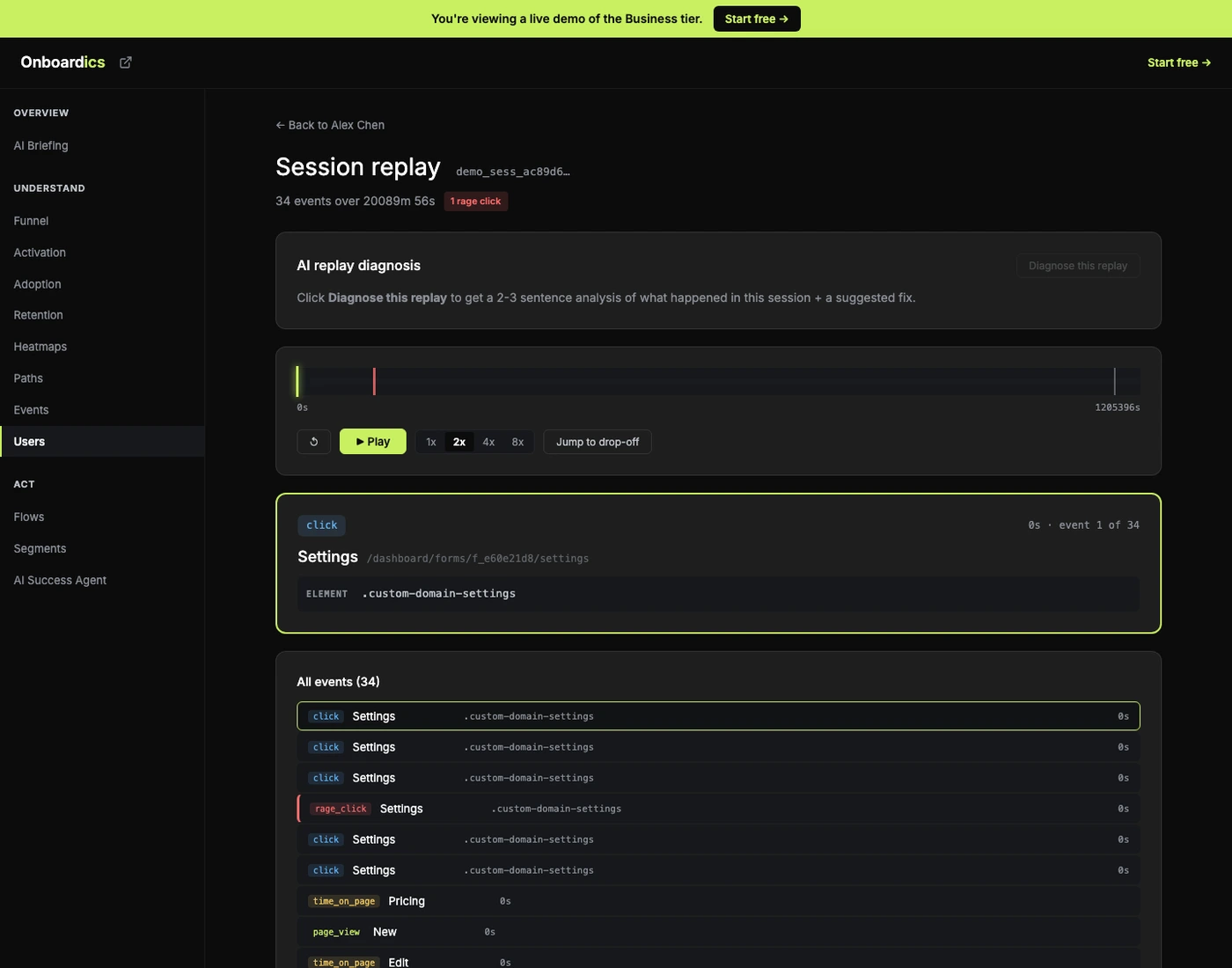
Sometimes you just need to see what the user did.
Session replay is powerful. Real session replay — the DOM-snapshotting, video-recording, 10GB-per-month kind — is also expensive to run, slow to load, and privacy-fraught. Click-stream replay gives you 80% of the value at 10% of the cost: a linear playback of the user’s event sequence with rage-click markers, error markers, and auto-detected drop-off moments. No DOM snapshots. No video. No storage explosion. And on Scale and above, an AI diagnosis of what actually went wrong — and what to build as a fix.
What the replay view shows
Scrubber with markers
Every event plotted on a single timeline. Red markers for rage clicks. Orange for JS errors. A drop-off marker shows where the user made their last meaningful interaction before the session ended.
1x / 2x / 4x / 8x speeds
Play forward through the session in real time (or skip ahead). Pauses, seeks, and the “Jump to drop-off” button let you dig into the interesting moments without scrubbing through idle time.
Why it happened (Scale+)
Claude reads the timeline and returns: a 2-sentence summary of what the user tried to do, a severity rating, a cited drop-off moment, a list of friction signals (each linking back to the exact second on the timeline), and the recommended fix — with a “Create flow →” CTA when it’s overlay-able, or a code spec when it needs an actual product change.
Why not DOM-snapshot session replay?
Hotjar, FullStory, LogRocket, and similar tools record the user’s full DOM and replay it as video. That approach has real strengths — visual fidelity — but also real costs:
- Storage. Full DOM captures generate gigabytes of data per active user. Pricing reflects this.
- Privacy. DOM recordings capture everything unless manually masked — form field values, PII in page content, tokens in URLs.
- Load time. A 10-minute session recording can take 30+ seconds to load before playback starts.
Click-stream replay uses events Onboardics already captures. No new infrastructure. No DOM snapshots. No PII in page content. The captured actions tell you what the user tried to do — which is what you actually need.
AI replay diagnosis (Scale+) — the capability nobody else ships
Every other session-replay tool shows you the recording and leaves interpretation to you. Onboardics reads the timeline and tells you what happened. Typical output on a stalled session:
Severity: critical. The user visited Form Builder and clicked Publish twice in rapid succession at 52s (rage click), then abandoned the page after 18 seconds. The Publish button likely didn’t respond visibly — no success state, no error state, just silence.
Drop-off moment: Second click on Publish button at 52s with no visible feedback.
Suggested fix (tooltip): Add a “Publishing…” in-progress state to the Publish button. Currently users see no feedback between click and completion, producing rage clicks and abandonment.
When the fix is overlay-able, the fix card has a “Create flow →” CTA that pre-populates the no-code flow builder. When it needs a real product change (the Publish button needs an in-progress state added in code, the form needs validation timing changed, the page needs a redirect), the recommendation is a code spec your engineer ships. Either way, you go from “watch a replay” to “know exactly what to fix” in under a minute.
Privacy-safe by default
Click-stream replay inherits Onboardics’ existing privacy properties:
- Form field values are never shown. The snippet’s PII denylist strips values at capture time.
- JS error text is redacted. 9-pattern PII chain on stack traces — tokens, keys, emails, UUIDs, cards, phones, home-dir paths.
- No DOM snapshots. If you don’t capture an event, it can’t show up in the replay. Period.
- Tenant-isolated. Every replay fetch goes through the same
requireProjectRolecheck as the rest of the dashboard.
See the Security page for the full PII redaction chain and tenant isolation architecture.
Tier access
- Free: Replay works on the public demo so you can evaluate the feature. Real projects require Diagnose or above.
- Diagnose: 10 replays per project per month. Enough to investigate the sessions that matter.
- Deploy: Unlimited replays. Replay any user, any session, as many times as you want.
- Scale: + AI replay diagnosis (24h cache, regeneratable). The “what actually happened” layer on top of the “what visibly happened” playback.
- Business: Same as Scale. Replay scales with unlimited team members + the Success Agent integration on user detail pages.
Pricing
Click-stream replay unlocks on Diagnose ($149/mo) with 10/month included. Unlimited replays on Deploy ($249/mo). AI replay diagnosis on Scale ($449/mo) and above. Try the feature on the interactive demo before you commit.